TanagerSpec
Welcome to the TanagerSpec crash course!
Throughout first four modules of the course, you explored a variety of concepts in hyperspectral data analysis and gradually built your toolkit by working through each lesson. The result is your own tool-kit has become somewhat unwieldy—packed with numerous functions but lacking an organized workflow and integrated tools to streamline your analysis.
This is where TanagerSpec comes in. TanagerSpec is Planet Labs’ purpose-built Python package tailored to help you unlock the full potential of Tanager hyperspectral data. It features an intuitive user interface and a workflow tailored for organizing, processing, and visualizing complex hyperspectral datasets.

Welcome to TanagerSpec, your comprehensive Python package for hyperspectral data analysis, bringing together nearly all the essential tools you’ll need and presenting them in a unified, user-friendly environment.
Why is this module designed?
Think of TanagerSpec as a comprehensive toolbox for hyperspectral analysis. Imagine a carpenter who owns every tool: saws, hammers, chisels, drills, and so on. But owning the tools is not enough. Could you actually make a sturdy chair with them without prior knowledge? In the same way, TanagerSpec gives you access to powerful functions for hyperspectral work, but knowing how to combine and use them, following the right "recipe" to create something meaningful, is often the biggest challenge. This module is designed to help you move beyond simply having the tools and toward mastering how to use them together effectively, based on what you have learned throughout the course.
As you can see in the diagram below, TanagerSpec provides many tools for different purposes.
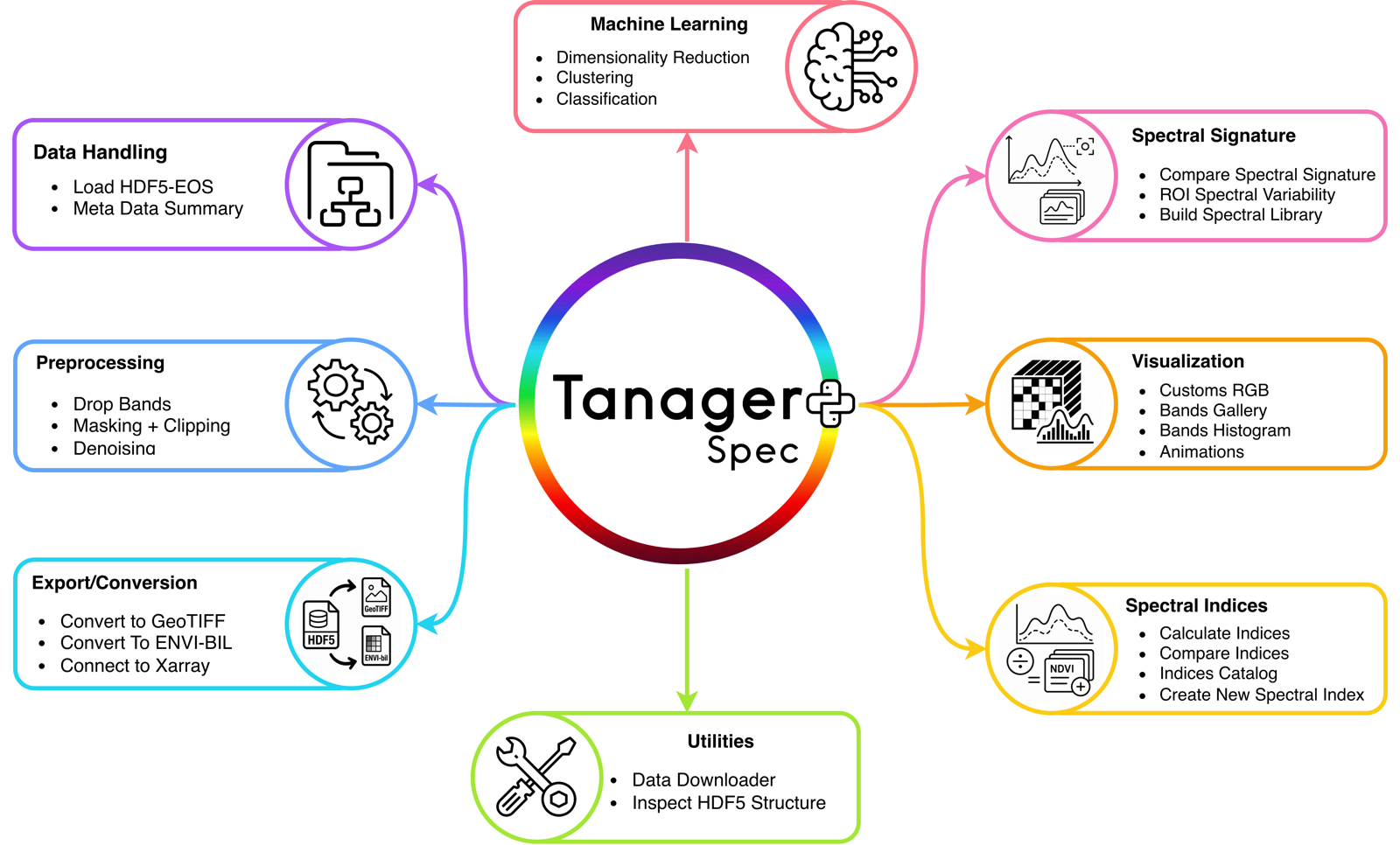
These tools are designed to help you focus less on low-level data handling or script building and more on the questions that matter to your hyperspectral analysis objectives.
What you will learn
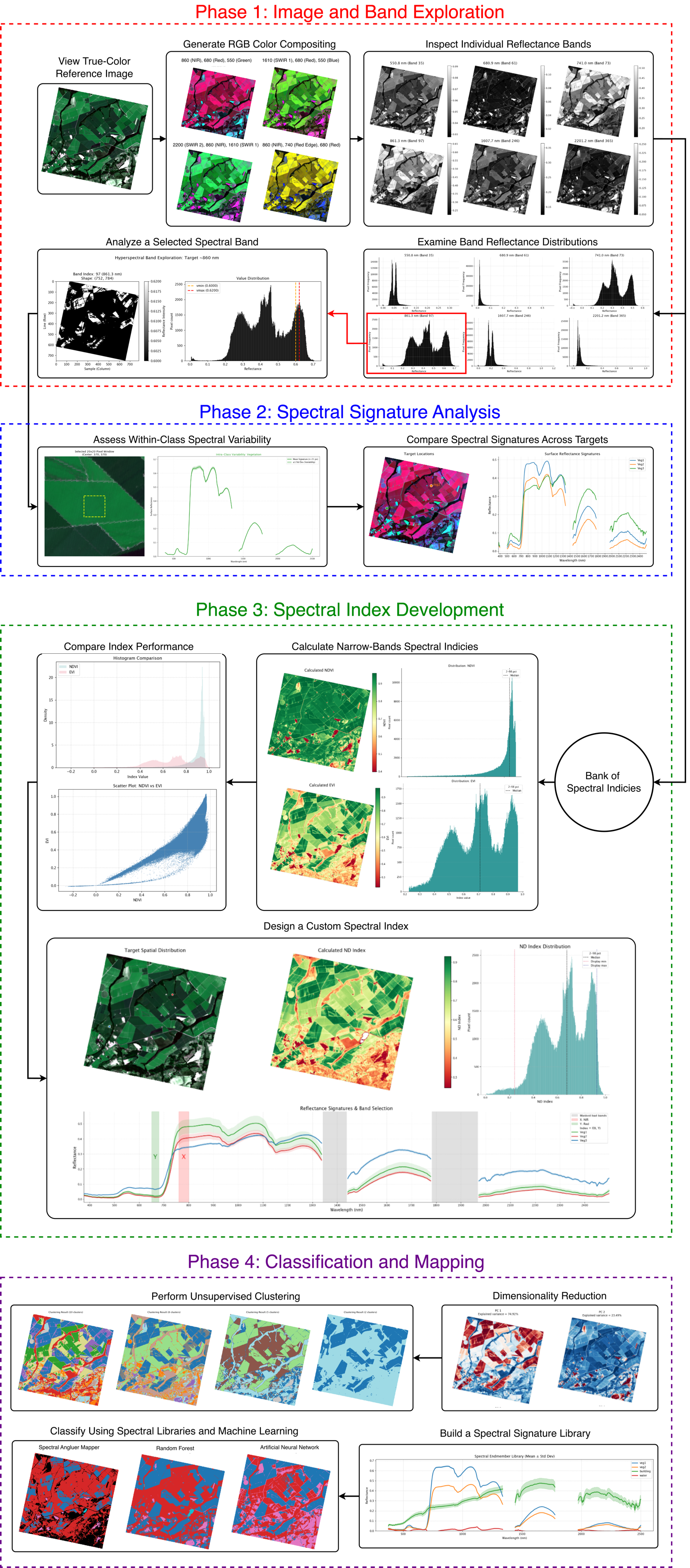
By the end of this module, you will be familiar with TanagerSpec's tools through a well-designed, end-to-end hyperspectral analysis workflow. You will be able to repeat this workflow or design your own workflow for your objectives.
This module is divided into sub-lessons that help you learn the workflow shown in the diagram below. This diagram shows the recipe that designed to help you utilize the tools of the TanagerSpec.
1. Orientation and Initialization
In this lesson, you will learn how to install and initialize the package. You will also use a built-in tool to download hyperspectral data from Open STAC and connect it directly to the package initialization process. In addition, you will learn how to read scene metadata.
2. Preprocessing
Before you can analyze hyperspectral scenes, it’s important to properly clean and prepare your data. TanagerSpec simplifies this step by offering a suite of preprocessing tools, including quality masking, reflectance clipping, wavelength (band) exclusion, and denoising.
In this lesson, you’ll learn how to leverage these preprocessing features, such as dropping unwanted bands, applying masks, clipping values, and reducing noise, to ensure your data is reliable and ready for downstream analysis.
3. Export and Conversion
Tanager-1 HDF5-EOS files are useful containers, but many workflows require standard remote sensing formats. TanagerSpec can export the main hyperspectral cube and companion layers for use outside Python, allowing you to convert HDF5-EOS files into GeoTIFF and ENVI-BIL files easily and correctly.
4. Visualization and Exploration
Visualization is one of the most important parts of hyperspectral analysis. TanagerSpec includes tools for quick scene inspection, band-level exploration, spectral signature comparison, and more. You will explore many visualization tools in this lesson.
5. Spectral Indices
Hyperspectral analysis often involves calculating and comparing spectral indices. This lesson introduces the built-in spectral index catalog, which bundles over 200 ready-to-use spectral indices spanning many application domains, vegetation, urban areas, water bodies, soils, snow, burn severity, and more, so you can compute a published index without hunting down its formula or matching wavelengths by hand.
6. Index Creator Lab
This tool is specially designed for scientists who are interested in building and designing their own spectral indices based on their objectives and experiments. TanagerSpec provides this tool to help users take advantage of the contiguous bands that Tanager provides.
7. Machine Learning Applications
Once you understand the spectral behavior of the scene, you can move into unsupervised and supervised analysis. TanagerSpec supports dimensionality reduction, clustering, spectral library construction, and classification.
Module outcome
At the end of this module, you should be able to take a Tanager-1 hyperspectral scene from raw HDF5-EOS input to useful analysis outputs: visual products, spectral plots, index maps, custom indices, clustered maps, classified maps, and exported files for further GIS or remote sensing work.
Most importantly, you will understand how to move from tools to decisions: using TanagerSpec not just to produce outputs, but to interpret hyperspectral information with purpose.